Pick the version that sounds like you.
I run trains
Your whole layout in one browser app — built around DCC-EX.
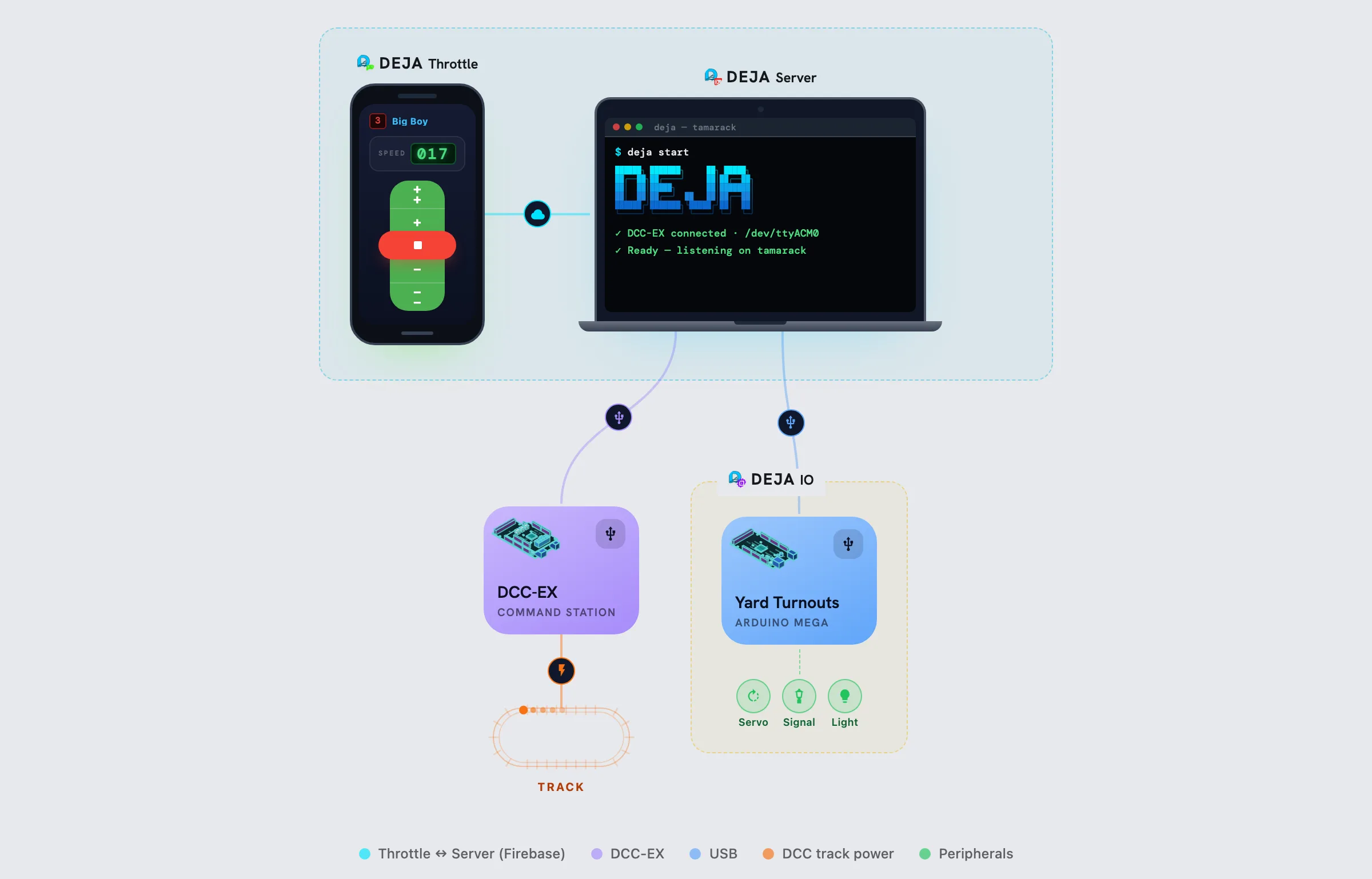
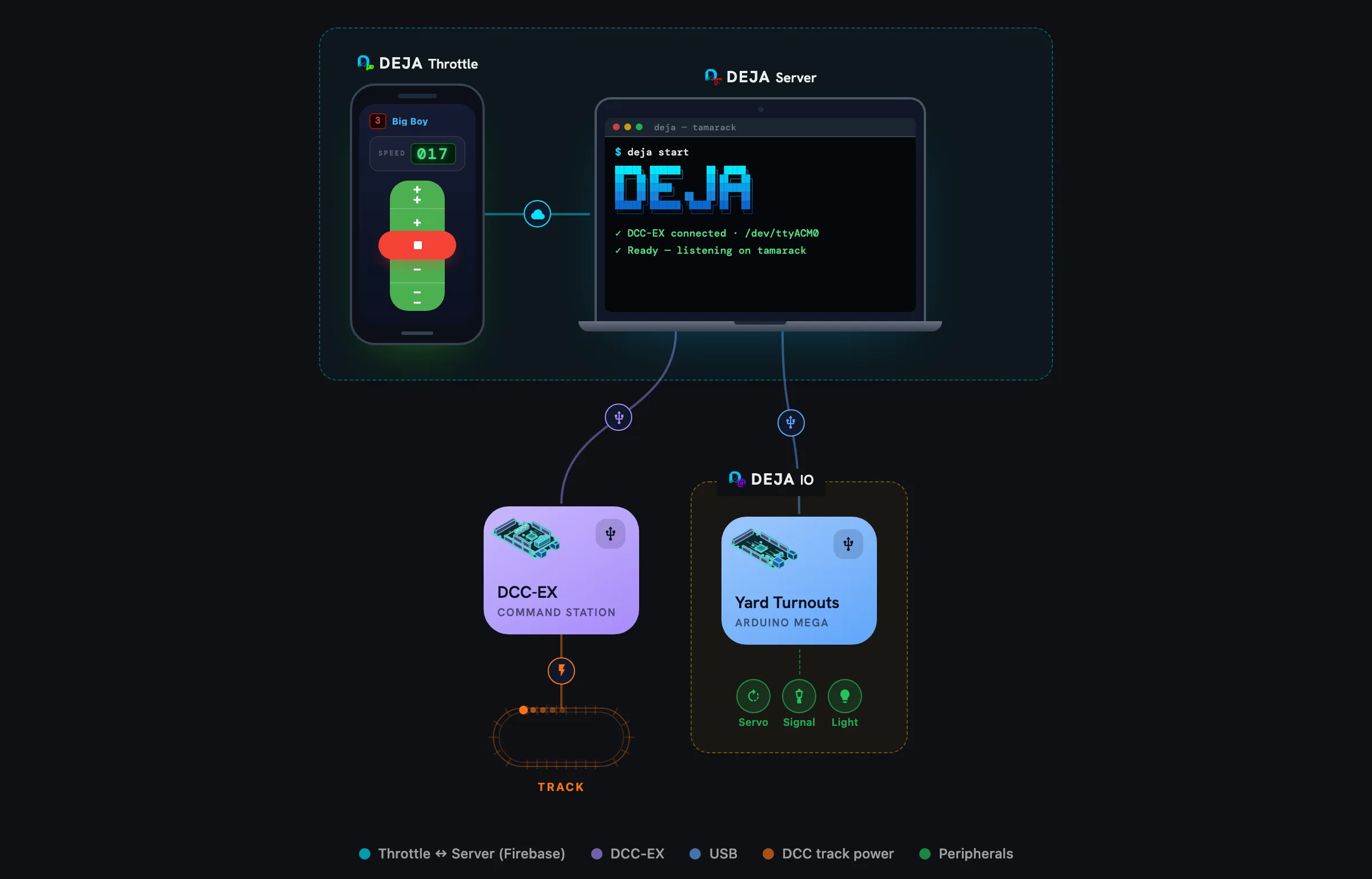
Keep your EX-CommandStation — DEJA doesn't replace it, it drives it, the way JMRI does. A laptop or Raspberry Pi near the layout runs the DEJA Server, plugged into the EX-CommandStation over USB.
Your roster, turnouts, signals, and routes live in DEJA Cloud, so any phone, tablet, or computer can open Throttle and see the same layout. Throw a turnout and every screen updates instantly.
- Locos
- Speed, direction, functions, consists, and a roster with photos.
- Turnouts
- DCC-EX, servo, or Kato. Servos and signals run on Arduino, ESP32, or Pico W boards — DEJA builds and flashes their firmware for you.
- Signals & sensors
- Block detection that drives Automations — “when the train trips sensor 3, set the home signal to red and line the siding.”
- Routes
- Line up a whole set of turnouts with one tap.
- Your throttles still work
- The server runs a built-in WiThrottle server, so Engine Driver, ProtoThrottle, and ThrottleCard connect as usual.
The one thing to know: the app never talks to the track directly. It sends the order — the server beside your layout carries it out.
New to all this
A remote control for your railroad — that works from anywhere.
DEJA is a remote control for a model railroad that runs in your web browser. Open it on a phone, tablet, or computer, and you can start a train, sound its horn, flip a track switch, or turn on the station lights.
Unlike an ordinary remote, it doesn't need to point at anything or be in the same room. It works the way a smart thermostat does: when you turn up the heat from your phone, your phone never talks to the furnace. It updates a setting online, and a small device in your home notices the change and tells the furnace.
DEJA works the same way. The app updates your railroad's settings online. A small computer next to the trains — the DEJA Server — notices the change and passes it to the EX-CommandStation, which sends the instruction through the rails to the right locomotive. Small helper boards around the layout run the lights, signals, and track switches, and sensors report back where the trains are.
Because everyone shares the same online settings, everyone sees the same thing. Several people can run trains at once, each on their own phone, and every screen stays in step.
- You tap
- Online
- DEJA Server
- EX-CommandStation
- Your train moves
I write software
A cloud-mediated control plane with a small agent at the edge.
In software terms, a DCC layout is an IoT network. The rails carry power and a digital data signal on the same two wires, and every locomotive has a decoder listening for its own address. The EX-CommandStation is an Arduino running DCC-EX firmware: it takes a tiny text protocol over USB serial — <t 3 50 1> is “loco 3, speed 50, forward” — and turns it into packets on the track. Turnouts, signals, and sensors are plain actuators and inputs.
Browser app ─▶ Firebase ◀─ DEJA Server (Node, beside the layout)
                           ├─ USB serial → EX-CommandStation → track
                           ├─ MQTT / WS  → ESP32 · Pico W IO boards
                           └─ WiThrottle → third-party throttles
Apps never touch hardware. They write desired state to Firestore (a throttle document whose speed is 50) or push a short-lived command onto a Realtime Database queue. The server is the only process that talks to hardware, and it only dials out — no port forwarding, no dynamic DNS. Real-time listeners keep every client in sync, so multi-operator sessions and remote access come for free.
TypeScript end to end: Vue 3 apps, a Node server, and an embedded MQTT broker for wireless IO.
See it in action.
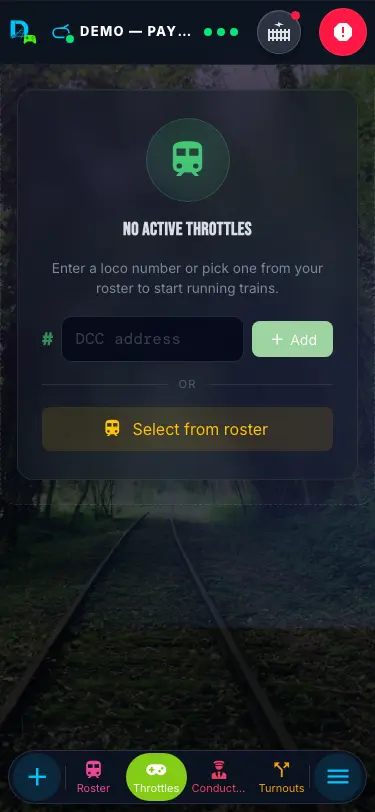
Control from any device.
Throttle connects to your layout in real time. Drive from your phone, edit the layout from your tablet, and every change syncs instantly across every device.
Throttle — drive trains and manage your roster, routes, and automation. Explore Throttle to see what it can do for your layout.
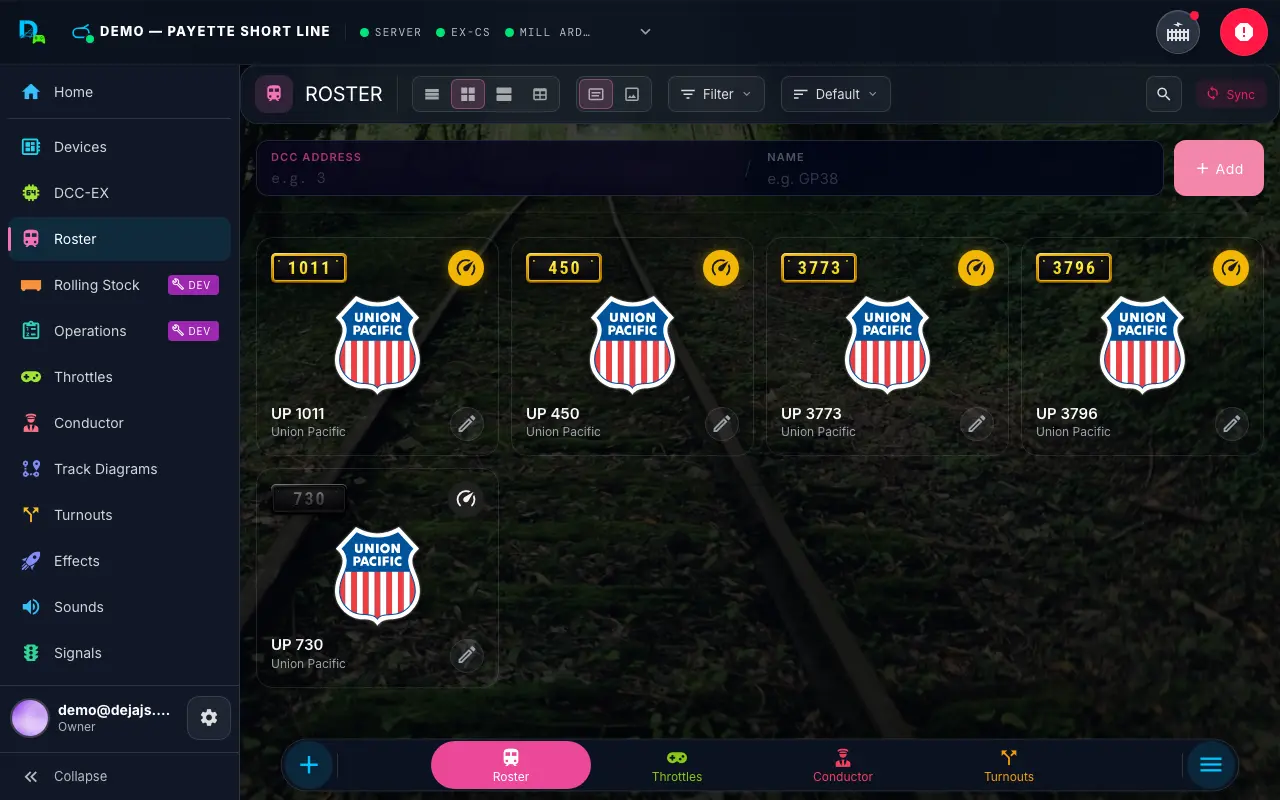
One command. Everything connects.
$ curl -fsSL install.dejadcc.com | bash
✓ Installed deja to ~/.deja
$ deja start
✓ Firebase connected (layout: tamarack)
✓ Serial: /dev/ttyUSB0 @ 115200
✓ MQTT broker connected
✓ WiThrottle server on :12090
Ready — listening for commands
The DEJA Server bridges your apps to your layout. It speaks Firebase to your apps and the cloud, serial to your DCC-EX EX-CommandStation, MQTT or WebSocket to your IO devices, and WiThrottle to ProtoThrottle, Engine Driver, ThrottleCard, and other WiThrottle clients.
Install it anywhere Node.js runs — your laptop, a Raspberry Pi, or a dedicated server. One curl to install, one deja start to launch, and your entire layout is online. Need remote access? Device logs and layout activity stream through DEJA Cloud to Throttle's Devices page — free for everyone, no port forwarding required.
Expand endlessly.
Anything that connects to a microcontroller becomes part of your layout. Wire up LEDs for building lights, servos for turnouts, sensors for block detection, speakers for crossing bells — the platform grows as your imagination does. And there's no code to write: DEJA IO's firmware comes with DEJA, built from your configuration and deployed from Throttle.
-
Arduino
USB SerialUSB serial — direct pin control. Great for turnout machines, signals, and panel buttons near the EX-CommandStation. For WiFi, use an ESP32 or Pico W.
-
ESP32
USB SerialMQTTWebSocketUSB serial, or WiFi over MQTT or WebSocket — wire it up near the EX-CommandStation, or place it anywhere on the layout wirelessly.
-
Pico W
MQTTWebSocketWiFi over MQTT or WebSocket — wireless placement anywhere on the layout. Perfect for lighting and sensors in hard-to-reach spots.
What you can build
- LED strips
- Animated lighting effects, building interiors, streetlamps
- Servos
- Turnout motors, crossing gates, semaphore arms
- Signals
- Block signals, ABS signaling, approach lighting
- Relays
- Track power switching, accessory control, automation
- Sensors
- IR detection, block occupancy, automation triggers
- Sound
- Crossing bells, ambient sounds, announcements
- Motors
- Turntable drives, conveyor belts, animated scenes
- Displays
- Station clocks, departure boards, status panels
- Buttons
- Physical control panels, dispatcher boards
Start simple. Scale up.
DEJA grows with your layout — no rewiring, no reinstalling.
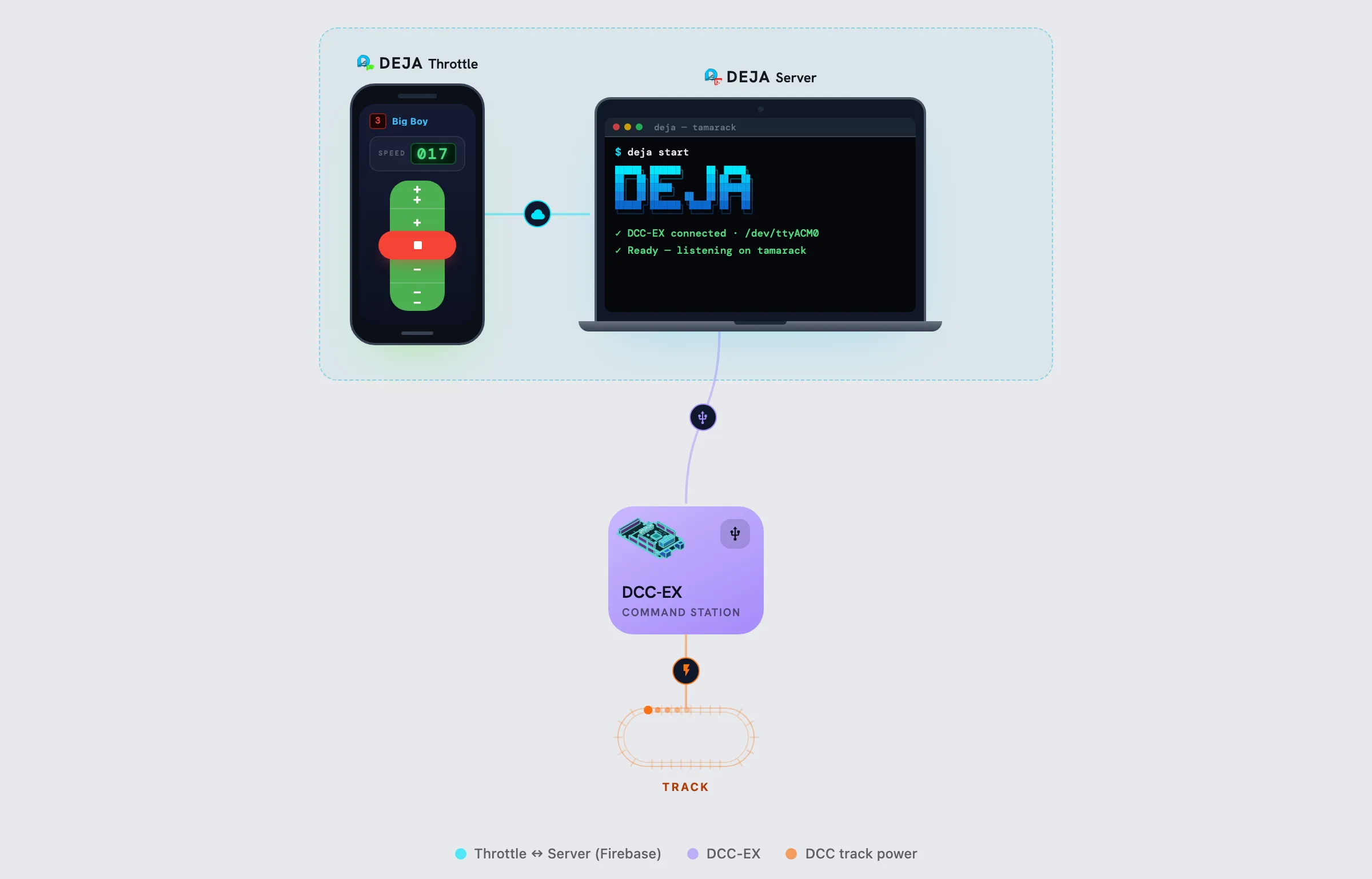
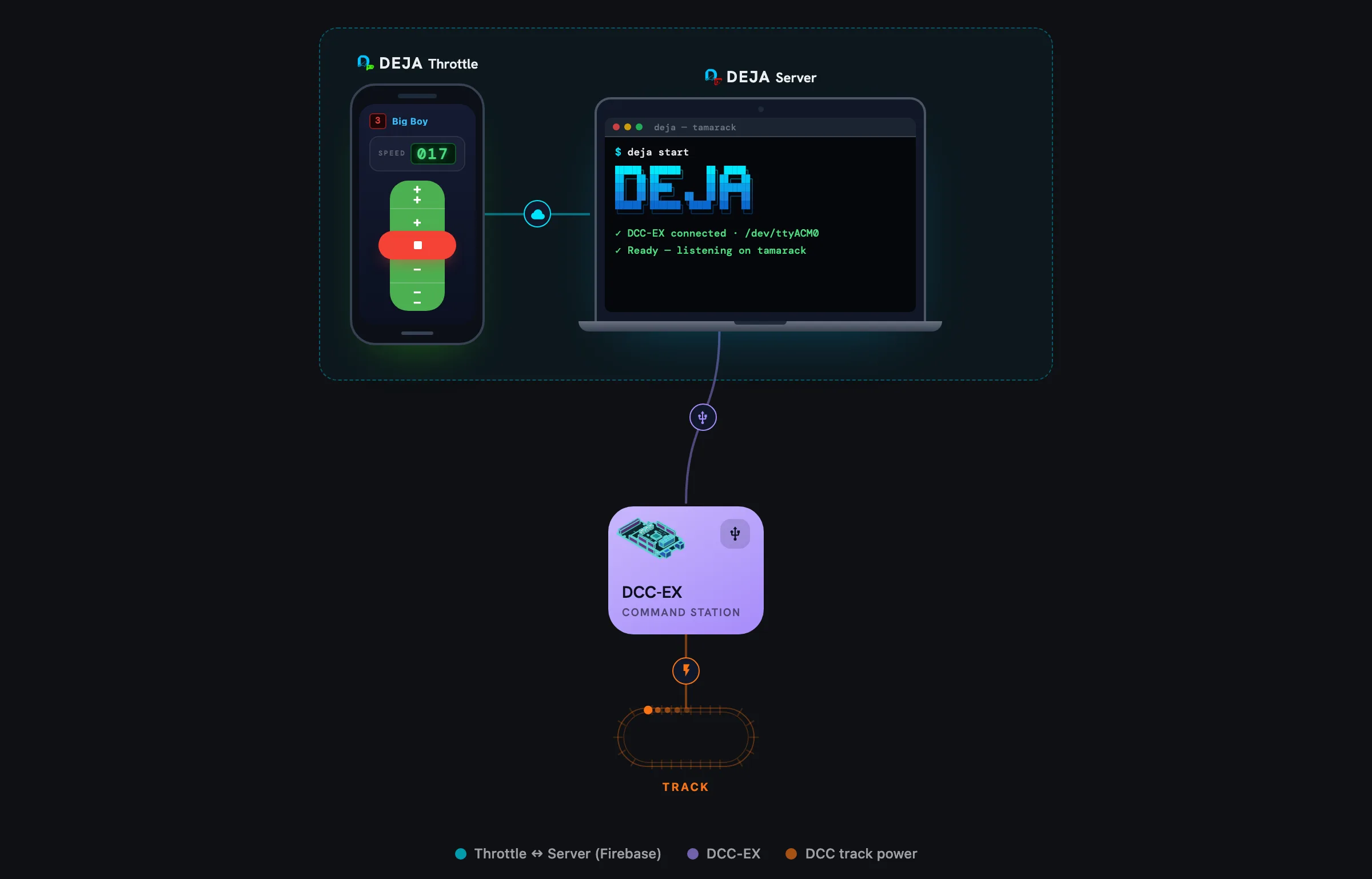
How it actually works.
DEJA runs on open protocols end to end — and we believe in being just as open about how the platform works. Here's what's happening behind the scenes.
How does USB serial work?
USB SerialThe DEJA Server connects to DCC-EX EX-CommandStations over USB serial at 115200 baud. Every DCC command — throttle, turnout, function — is wrapped in angle brackets and sent as text: <t 3 50 1> means "set address 3 to speed 50, forward." The command station translates these into DCC signals on the track. Simple, plain-text, and documented by DCC-EX.
How does MQTT work?
MQTTMQTT is a lightweight pub/sub protocol built for constrained hardware. The DEJA Server runs a broker that Arduino, ESP32, and Pico W devices connect to over WiFi. Every message shares the same {action, payload} shape as the WebSocket protocol — publish one to a device's topic and it acts in milliseconds.
{
  "action": "pin",
  "payload": { "pin": 4, "state": true },
  "device": "arduino-1"
}
What about WebSocket?
WebSocketWebSocket is an IO-device transport — a wireless alternative to MQTT for ESP32 WiFi and Pico W boards. Each device dials the DEJA Server at /device with its own token, and the port opens only when your layout has a WebSocket device. No app uses it: Throttle reaches your server through DEJA Cloud, so there is nothing to open on your network for your phone or tablet. Messages are small JSON envelopes, the same shape as MQTT.
{
  "device": "esp32-yard",
  "sensor": 2,
  "state": 1
}
Does DEJA support WiThrottle?
WiThrottleYes — the DEJA Server runs its own built-in WiThrottle server, replacing JMRI for that role. ProtoThrottle hardware, Engine Driver, ThrottleCard, and other WiThrottle clients connect directly and drive locomotives right alongside the DEJA Throttle app. We encourage you to use whatever throttle — or throttles — you like best. ThrottleCard in particular is worth a look, with Apple Watch control and game-controller support (Xbox, PlayStation, MFi) built in.
Visit ThrottleCard (opens in a new tab)How does authentication work?
Throttle signs in with Firebase Authentication. Sessions are backed by signed JWT tokens and verified on every request, and the DEJA Server links to your account and layout before it will connect. You can share a layout with guest operators without handing out your password, and revoking access is instant.
Is my layout data secure?
Your roster, routes, turnouts, and effects live in Firestore and Realtime Database, protected by per-layout security rules — only accounts you've granted access can read or write them. All traffic between the apps, the server, and Firebase is TLS-encrypted in transit and encrypted at rest on Google's infrastructure. No layout data ever touches a public internet path in plaintext.
How does Firebase work?
Firebase provides real-time sync between your apps and the server. When you change a throttle setting on your phone, Firebase pushes that change to the server instantly — no polling, no refresh. Your roster, routes, turnout states, and effects are all stored in Firebase so they persist across sessions and devices.
How does remote monitoring work?
Your DEJA Server opens an outbound-only connection to DEJA Cloud and streams live device telemetry to your layout's private channel whenever someone has a device log open. Throttle's Devices page reads that stream in real time — free for everyone. There are no inbound router ports to forward, no firewall rules to punch holes in, and nothing on your home network is ever exposed to the internet.
How is remote data access secured?
Every remote read goes through Firebase Authentication and per-layout security rules — only members of your layout can see its data. The Server itself only ever dials out; combined with account linking, that's identity + authorization before any layout data leaves your network.
How does the DEJA CLI work?
The DEJA CLI is a single command that starts the entire platform. It launches the Node.js server, connects to your DCC-EX EX-CommandStation via USB serial, connects to Firebase for cloud sync, and optionally starts the MQTT broker for IO devices and the WiThrottle server. One command: deja start.
Built for today's layouts.
JMRI has powered DIY DCC-EX layouts for decades, but it's built on Java — a heavyweight runtime, desktop-only, and often finicky to configure and keep running. DEJA started as a personal project to bring a modern TypeScript ecosystem to DCC-EX instead: no JVM, no XML config files, just a Node.js server and browser-based apps that sync in real time. The goal is to keep growing into the go-to platform for DIY DCC-EX layout builders — model railroaders and clubs who want something built for today's devices.
The stack
- TypeScript
- End-to-end type safety — from the server to every app.
- Vue 3
- Reactive, component-driven UI with Composition API.
- Firebase
- Cloud sync, authentication, and real-time database.
- MQTT
- Lightweight IoT messaging for wireless device control.
- Node.js
- Runs anywhere — laptop, Raspberry Pi, dedicated server.
How it all connects
Every piece of the stack has a purpose. TypeScript catches errors before they reach your layout. Firebase delivers every command in real time and keeps your roster and routes synced across every device. MQTT lets you place wireless IO devices anywhere on the layout without running wires. And the server ties it all together — one process that speaks every protocol your layout needs.
vs. legacy desktop software
- No Java runtime required — runs in any browser
- Multi-device by default, not single-screen
- Modern, touch-friendly interface — not desktop-era UI
- Cloud sync keeps your layout data safe and accessible
- Real-time updates across every connected device simultaneously
vs. standalone throttle apps
- Not just a throttle — a complete platform
- Layout management, automation, effects, signals, sounds
- Works on any device with a browser — iOS, Android, desktop
- Arduino and Pico W expansion for physical IO control
- Cloud-powered roster, routes, and configuration management